

Today’s workplace is noisy, fast‑paced, and hungry for instant answers. Employees no longer want to wait in line for HR, hunt for a manager, or chase down a form in a shared drive. They want it here, now, and on their own terms.
That’s where human resources kiosks come in — quiet, self‑serving machines that turn the chaos of paperwork, policy questions, and onboarding friction into something smooth, simple, and human‑centered. When you pair them with interactive kiosks, digital signage, and interactive digital signage, the result is not just automation: it’s engagement.
Let’s explore how one real‑world organization — Trident Seafoods — used this exact mix to simplify their HR ecosystem and how you can do the same.
A Trident Seafoods case study
Trident Seafoods is one of the largest seafood producers in the U.S., with employees working in remote processing plants, cold‑storage facilities, and busy docks. Before they modernized their HR access, team members often had to walk long distances to reach an HR desk, interrupt a line‑supervisor, or wait for a form to be printed or approved.
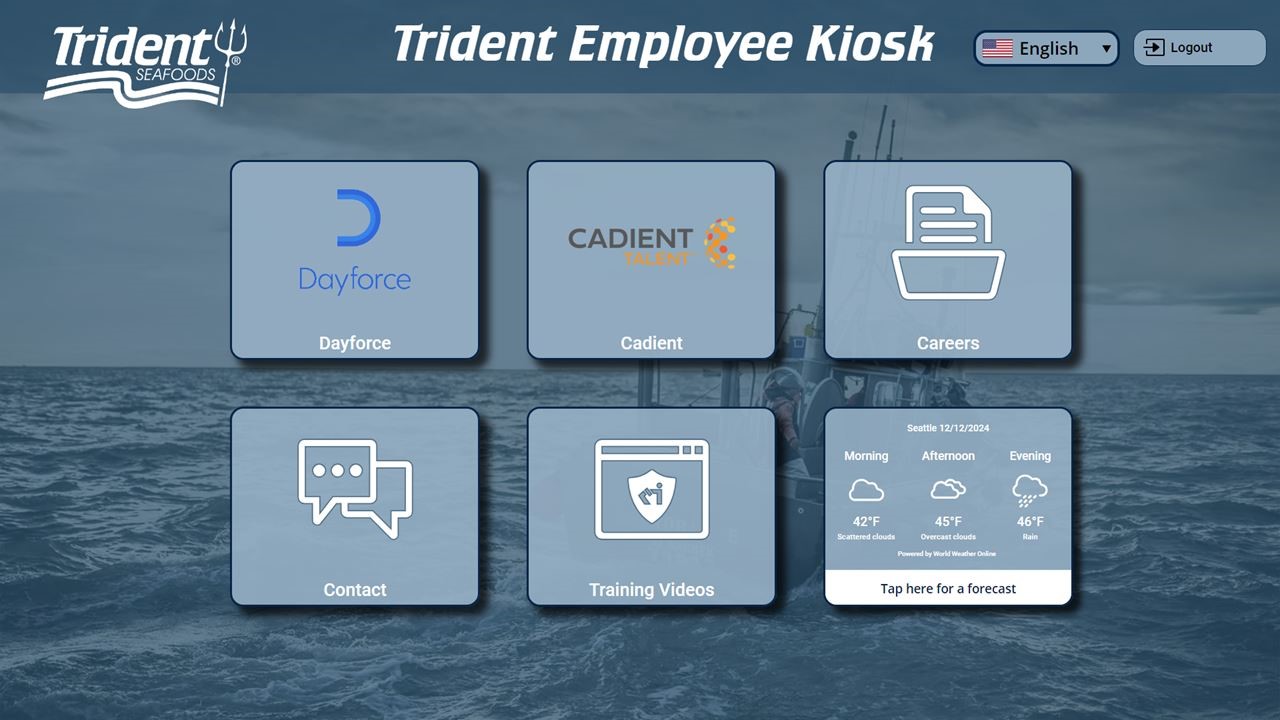
In its case study on digitalizing HR access through kiosks, the company describes how it rolled out self‑service HR kiosks throughout several facilities. These interactive kiosks allowed employees to:
-
View and print pay stubs
-
Access HR policies and handbooks
-
Request time‑off or schedule changes
-
Review training schedules and sign‑up for modules
-
Quickly confirm employment details
The transformation wasn’t just aesthetic. It reduced foot traffic to central HR stations, cut time‑off request delays, and gave employees a consistent, always‑on HR presence.
From a human‑resources perspective, that’s the promise of a human resources kiosk: make core functions feel effortless, not bureaucratic.
Why HR departments are falling in love with kiosks
If you think of a kiosk as a “quiet HR assistant,” you’re on the right track. But the real magic happens when you move beyond transactions and think strategically.
1. Reducing wait times and shoulder‑to‑screen bottlenecks
Nobody enjoys waiting. When employees line up for basic HR tasks, they’re not just losing time; they’re losing focus, energy, and morale.
Kiosks reduce wait time by letting employees serve themselves. Instead of a bottleneck at a single desk, you spread service across multiple touchpoints. For guidance on designing for this behavior, you can explore how kiosks reduce wait time and what that means for both employees and HR staff.
2. Amplifying self‑service without alienating empathy
Modern employees expect self‑service, but they still crave human support when it’s needed. The key is to design a human‑resources experience where the kiosk handles routine tasks (forms, status checks, FAQs) and routes emotional or complex queries to real people.
This balance is central to our look at kiosks and customer experience, and it applies equally to internal HR interactions.
3. Turning HR into a 24/7 presence
Factories, hospitals, and multinational enterprises don’t run from 9 to 5. Neither should HR. With interactive kiosks positioned in high‑traffic areas, employees can access pay information, training resources, or policy updates before, after, or between shifts.
This is the quiet power of digital signage and interactive digital signage in the HR space. Signs aren’t just “for the lobby.” They can welcome employees, remind them of benefits windows, or prompt them to use the HR kiosk for common tasks.
How interactive kiosks and digital signage work together
A human‑resources kiosk doesn’t live in a vacuum. It’s part of a larger ecosystem of digital signage, interactive displays, and employee workstations. When you blend them intentionally, you create a seamless experience that feels like a single conversation — not a series of disconnected screens.
1. Attract, guide, convert
Attracting kiosk users starts with motion and message. A large interactive display near the entrance can show quick headlines like “Check your pay stub here” or “New benefits open enrollment — learn how.”
Once employees approach, the physical interactive kiosk becomes the next step: a private, empowered touchpoint where they can log in, complete their task, and move on.
2. From information to interaction
Digital signage is great for broadcasting; interactive kiosks are great for doing. Use digital signage to answer top‑level questions (“What are our PTO rules?”) and kiosks to handle the next step (“Request time off now”).
This strategy is at the heart of a digital signage and kiosk strategy that turns passive screens into active helpers.
3. Building a kiosk‑friendly culture
Employees won’t use something they don’t trust or understand. Clear signage, simple icons, and on‑screen prompts matter — and so does user experience.
Guidance on kiosk user experience explains how to minimize friction, avoid confusing menus, and make tasks feel almost intuitive.
Designing human resources kiosks that people actually want to use
A poorly designed HR kiosk can feel like a prison, not a helper. A well‑designed one feels like a friendly concierge.
1. Keep the interface clean and task‑driven
When someone walks up to a human resources kiosk, the first screen should quietly answer: “What can I do here?”
-
Use fewer than 6 primary options
-
Use large, readable icons
-
Avoid dense text walls
A strong design reduces the chance of confusion or frustration. For more detail, see our guide to design tools for kiosks.
2. Prioritize accessibility from the start
Accessibility isn’t a “nice‑to‑have” for HR. It’s a legal and ethical responsibility. Ensure your kiosk software supports:
-
Screen reader compatibility
-
High‑contrast mode and large text
-
Keyboard or voice‑assisted navigation
Resources on accessibility‑focused kiosk design dig into specifics so you’re not just compliant — you’re genuinely inclusive.
3. Blend form and function
An HR kiosk can be beautiful and useful at the same time. Use brand colors, consistent typography, and clear micro‑copy (“Submit,” “Confirm,” “Cancel”) to create a visual language employees can recognize instantly.
Security, privacy, and trust in HR kiosks
When kiosks touch HR data — pay, benefits, discipline records — security isn’t optional. It’s the first page of the story.
1. Lock down the browser and permissions
Kiosk software should prevent users from:
-
Opening unauthorized browsers or apps
-
Accessing the device’s file system
-
Installing or changing software
Our guide on browser‑lockdown kiosk software explains how to keep that barrier strong without making the interface feel restrictive.
2. Use strong authentication and session management
Employees should log in — not just “use anonymously.” That lets you tailor the experience (e.g., “Welcome, Maria — you have 12 PTO days left”) while still protecting confidentiality.
Best‑practice tutorials on kiosk security best practices and kiosk‑security considerations cover identity, session timeouts, and data‑handling norms.
3. Train supervisors and HR staff
A kiosk can’t replace human judgment in every case. But it can hand guidance to HR teams. Resources on kiosk user experience and kiosks for employee training help you build a sustainable support model.
Real‑world impact: What Trident Seafoods and others teach us
Trident Seafoods’ HR kiosk rollout was not a one‑time tech experiment. It was a strategic shift from reactive service to proactive support.
-
Employees gained faster, more respectful access to information
-
HR teams reclaimed time for higher‑value work
-
The company built a scalable model for its remote locations
Similar patterns appear in other industries, from healthcare digital signage to restaurant‑industry kiosks and employee self‑service kiosks in education. You can see more examples in the case studies and white papers section, which shows how kiosks transform everything from front‑desk check‑in to internal training.
How to begin your own HR kiosk journey
If this all sounds compelling, where do you start?
1. Map the most painful HR tasks
Which HR questions or tasks are asked repeatedly? Think:
-
New‑hire onboarding
-
PTO requests
-
Payroll or benefits questions
-
Policy or handbook access
Addressing these in your kiosk strategy is a great first step. For a deeper look, see how kiosks simplify HR access.
2. Plan your kiosk project
Before you buy a screen, sketch an experience. How many touchpoints will you need? Where will they sit in the facility? How will you measure success?
Our guide to planning kiosk projects walks you through needs‑assessment, site selection, and change‑management.
3. Choose the right hardware and software
Not every kiosk is the same. Retail, healthcare, and factory environments have different requirements. Learn how to choose kiosk hardware and explore SiteKiosk’s features so you get the right blend of control, security, and flexibility.
Looking ahead: The future of HR kiosks
As hybrid work continues and frontline employees demand more autonomy, human resources kiosks will become less of a “nice‑to‑have” and more of a core piece of infrastructure.
Future trends might include:
-
Voice‑assisted HR kiosks
-
Integrated training and micro‑learning modules
-
Real‑time analytics to optimize HR content and pathways
You can dive deeper into that future with our coverage of kiosk‑trends and how analytics can optimize your kiosk strategy.
Bringing it all together
Simplifying human resources doesn’t mean stripping away humanity. It means using tools like interactive kiosks, digital signage, and interactive digital signage to remove friction from the mechanical parts of work so you can bring more of the human back into HR.
If you’re ready to explore how this can look for your organization, start with the benefits of using kiosks and the industries benefiting from kiosks — then move into more specific areas like kiosks for employee training and kiosk‑marketing campaigns.
Done right, a human resources kiosk is no longer just a screen in the breakroom. It’s a quiet, powerful partner in building a happier, better‑informed workforce.
Why Choose SiteKiosk Online for Your HR Kiosk Needs?
SiteKiosk Online is a leading cloud-based kiosk software designed for secure, flexible, and scalable employee self-service deployments. Key advantages include:
- Centralized device management—update and configure HR kiosks from anywhere.
- Easy integration with existing HRIS, time-tracking, and benefits platforms.
- Robust data security features to protect your company and staff.
- Customizable design options for seamless branding.
- Unmatched reliability—backed by years of experience in the kiosk industry.
Ready to Transform Your Workplace?
Investing in HR Kiosks powered by SiteKiosk Online is a strategic move for forward-thinking businesses seeking to:
- Streamline HR operations
- Empower employees with easy, secure access to HR services
- Enhance communication, compliance, and efficiency at every level
Experience the benefits of modern, cloud-based kiosk software for employee self-service. Discover how SiteKiosk Online can help you create the perfect HR Kiosk solution for your business—today and in the future. Signing up for a free trial account takes a couple of minutes. Click here to get started.
Frequently Asked Questions: Simplifying Human Resources Kiosks
Q: What is a human resources kiosk?
A: A human resources kiosk is a self‑service interactive kiosk that lets employees access HR information and services on‑site, such as pay stubs, time‑off requests, policies, and training materials without going to a traditional HR desk.
Q: How do interactive kiosks differ from regular digital signage?
A: Basic digital signage is usually one‑way communication (display only), whereas an interactive kiosk lets users touch the screen, log in, and take action. When interactive digital signage is applied in HR spaces, it can guide employees to a nearby kiosk or reinforce key messages like “Check your benefits now.”
Q: What kinds of HR tasks can employees handle at a kiosk?
A: Common tasks include viewing and printing pay stubs, requesting time off, reviewing or updating personal information, accessing HR policies and handbooks, signing up for training, and checking benefits or enrollment status.
Q: Why should HR teams care about kiosks and digital signage?
A: HR kiosks reduce congestion around HR desks, cut down on repetitive questions, and provide consistent, 24/7‑style access to information. Together with digital signage and interactive displays, they create a smoother, more engaging employee experience.
Q: Are human resources kiosks only useful in large companies like Trident Seafoods?
A: No. While large organizations like Trident Seafoods see obvious benefits, smaller and mid‑sized businesses can also use HR kiosks, especially in environments with shift work, multiple locations, or limited on‑site HR staff.
Q: How do I keep HR data secure on a kiosk?
A: Use kiosk software with browser lockdown, strong user authentication, and session management so employees can’t access other apps or change settings. For more detail, see practices on kiosk security best practices and kiosk‑security considerations.
Q: What should an HR kiosk user‑experience feel like?
A: It should feel fast, private, and intuitive. Employees should be able to complete common tasks in a few taps, with clear language and simple navigation. Guidance on kiosk user experience and attracting kiosk users can help you design that experience.
Q: Can kiosks replace HR staff entirely?
A: No. Kiosks are best for repeatable, routine tasks. Complex or sensitive issues still need human judgment and empathy. The goal is to free HR staff from administrative noise so they can focus on strategic work and personal support.
Q: How do I decide where to place HR kiosks?
A: Place them in high‑traffic areas near break rooms, entrances, or timeclocks where employees naturally pause. Look at where employees already linger and choose spots that feel private enough for sensitive HR tasks.
Q: Are there tools to help plan and design HR kiosks?
A: Yes. You can use guidance on planning kiosk projects and design tools for kiosks to map content, layout, and user flows before you roll anything out.
Q: What are the main benefits of human resources kiosks for employees?
A: Faster access to pay and schedule info, less waiting in line, 24/7‑style availability, and the ability to handle common tasks on their own time. This transparency and convenience boost overall employee satisfaction.
Q: Do HR kiosks need to be accessible?
A: Yes. HR kiosks must be accessible to employees with different abilities. This means readable text, screen‑reader support, high‑contrast modes, and clear navigation. You can learn more in our guidance on accessibility‑kiosk design.
Q: How can HR ensure employees actually use the kiosk?
A: Use clear on‑screen instructions, provide brief onboarding, and use digital signage or wall graphics to highlight the kiosk’s purpose and benefits. You can explore ideas on attracting kiosk users and kiosk user experience to increase adoption.
Q: Can HR kiosks integrate with other systems like payroll or benefits platforms?
A: Yes. Many kiosk software platforms support integration with existing HRIS, payroll, or document‑management tools. This lets you pull live data into the kiosk interface while keeping the backend secure.
Q: What should I measure to see if HR kiosks are working?
A: Track usage frequency, task completion rate, average time per task, and employee feedback. You can also use kiosk‑based analytics to see which options are most popular and refine your design and content over time.